flutter 可以使用的 togglebutton 樣式
flutter 可以使用的 togglebutton 樣式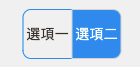
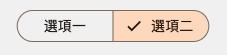
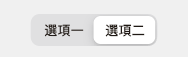
有製作切換選項的按鈕需求,查詢之後得到三種可用的樣式
- ToggleButtons
 1ToggleButtons(
 2  isSelected: [controller.isFirstSelected, controller.isSecondSelected],
 3  onPressed: (int index) {
 4    controller.toggleSelection(index);
 5  },
 6  children: [
 7    Text('選項一'),
 8    Text('選項二'),
 9  ],
10  selectedColor: Colors.white,
11  fillColor: Colors.blue,
12  borderColor: Colors.blue,
13  borderRadius: BorderRadius.circular(8),
14)- SegmentedButton (Flutter 3.12+)
 1SegmentedButton<String>(
 2  segments: [
 3    ButtonSegment(value: 'option1', label: Text('選項一')),
 4    ButtonSegment(value: 'option2', label: Text('選項二')),
 5  ],
 6  selected: {controller.selectedOption},
 7  onSelectionChanged: (Set<String> newSelection) {
 8    controller.updateSelection(newSelection.first);
 9  },
10)- CupertinoSlidingSegmentedControl (iOS 風格)
 1CupertinoSlidingSegmentedControl<String>(
 2  children: {
 3    'option1': Text('選項一'),
 4    'option2': Text('選項二'),
 5  },
 6  groupValue: controller.selectedOption,
 7  onValueChanged: (String? value) {
 8    controller.updateSelection(value!);
 9  },
10)